RIGHT JOIN
The right join command returns all rows from the right table and only the matching rows from the left table.
For example:
Let's use the countries table and regions table for this example. Refer Introduction to know about this table and the database.
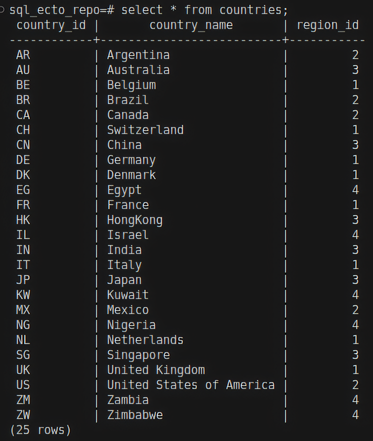
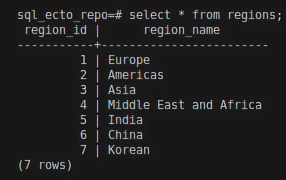
select * from countries right join regions on countries.region_id = regions.region_id;
The right join will return all rows from the regions table and only the rows from the countries table where the region_id column matches the two tables.
Result:
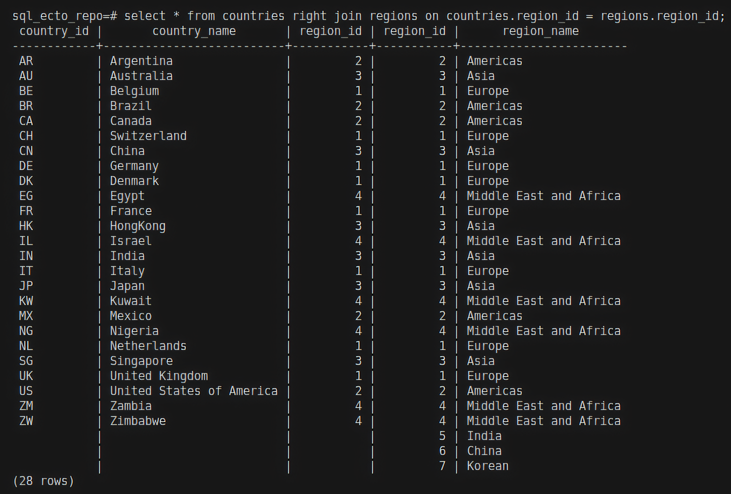
You can see that all records from the regions table are returned here, even though the region_name values like India, China, and Korean didn't have matching values with the countries table.
Ecto query for right join
join/5
The join/5 function is used to perform a right join in Ecto. For more information about the join/5 function, visit my JOIN page. Now lets explore the :right option in join.
:right option in join
Expression
For Example:
HR.Region
|> join(:right, [r], c in HR.Country, on: r.region_id == c.region_id)
|> select([r, c], [r,c])
|> HR.Repo.all()
The above query will return all records from HR.Country and only matching records from HR.Region.
- The
HR.Regionschema as first argument. [r]is the reference variable forHR.Regionschema. To know about reference variable refer Aliases in Ecto.c in HR.Countryis another schema and reference variable.on: r.region_id == c.region_idcondition.
Result:
iex(8)> HR.Region |> join(:right, [r], c in HR.Country, on: r.region_id == c.region_id) |> select([r, c], [r,c]) |> HR.Repo.all()

[
  [
    %HR.Region{
      __meta__: #Ecto.Schema.Metadata<:loaded, "regions">,
      region_id: 2,
      region_name: "Americas"
    },
    %HR.Country{
      __meta__: #Ecto.Schema.Metadata<:loaded, "countries">,
      country_id: "AR",
      country_name: "Argentina",
      region_id: 2
    }
  ],
  [
    %HR.Region{
      __meta__: #Ecto.Schema.Metadata<:loaded, "regions">,
      region_id: 3,
      region_name: "Asia"
    },
    %HR.Country{
      __meta__: #Ecto.Schema.Metadata<:loaded, "countries">,
      country_id: "AU",
      country_name: "Australia",
      region_id: 3
    }
  ],
  [
    %HR.Region{
      __meta__: #Ecto.Schema.Metadata<:loaded, "regions">,
      region_id: 1,
      region_name: "Europe"
    },
    %HR.Country{
      __meta__: #Ecto.Schema.Metadata<:loaded, "countries">,
      country_id: "BE",
      country_name: "Belgium",
      region_id: 1
    }
  ],
  [
    %HR.Region{
      __meta__: #Ecto.Schema.Metadata<:loaded, "regions">,
      region_id: 2,
      region_name: "Americas"
    },
    %HR.Country{
      __meta__: #Ecto.Schema.Metadata<:loaded, "countries">,
      country_id: "BR",
      country_name: "Brazil",
      region_id: 2
    }
  ]
]
In the above result, you can see that all records in HR.Country are returned. But only records in HR.Region that have the same value in the region_id are returned.
Keywords
HR.Repo.all(from r in HR.Region, right_join: c in HR.Country, on: r.region_id == c.region_id, select: [r, c])