JOIN
The join/inner join command is used to join multiple tables based on a particular column. Tables can also be joined using the same columns. There are four types of join.
inner joinright joinleft joinfull outer join
inner join is the default join. so join and inner join are the same. Let's how join works.
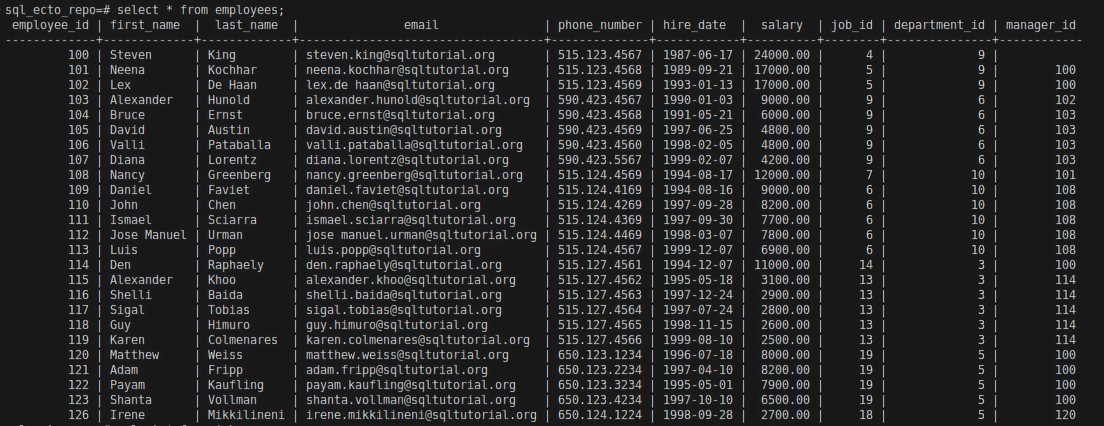
We are using the employees table and jobs table for this example.
employees table
jobs table
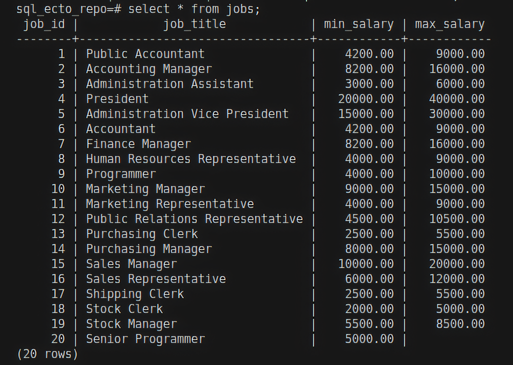
The employees and the jobs tables have a common column called job_id. We can join these two tables and create one big table using this job_id column.
For Example:
select * from employees join jobs on employees.job_id = jobs.job_id;
Query Explanation:
- The operands in
join/inner joinspecify which tables are going to be joined. Here, we definedemployeesandjobsthat going to be joined. ONis used to specify which columns in the tables have the same values. It indicates how these tables are related to each other. - Here,employeesandjobsare related by the columnjob_id. So we are joiningemployeesandjobstables that are related to each other by the columnjob_id.- We are selecting every column from both tables.
Result:
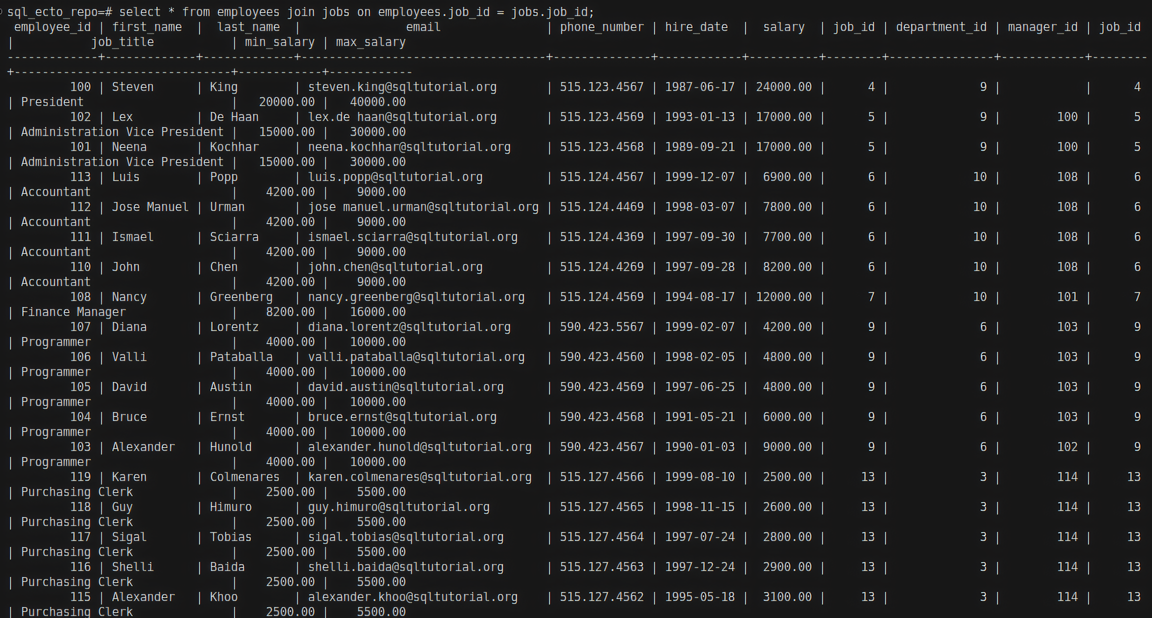
In the above table, you can see that both employees and jobs are joined together, with all the columns appearing.
Example to select only some columns that need to appear:
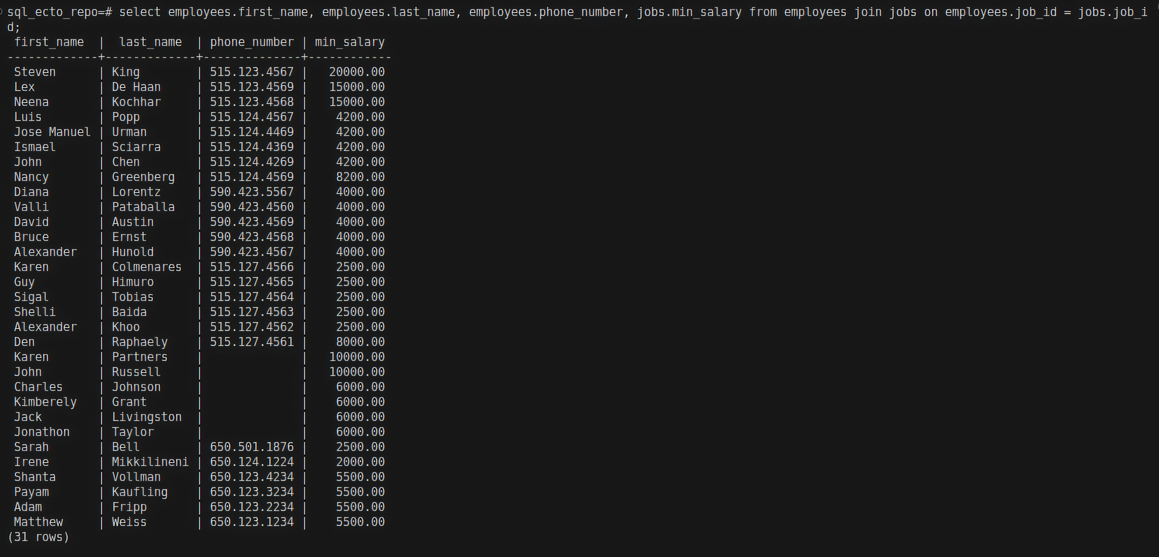
select employees.first_name, employees.last_name, employees.phone_number, jobs.min_salary from employees join jobs on employees.job_id = jobs.job_id;
In the above example, we are selecting only first_name from employees, last_name from employees, phone_number from employees, and min_salary from jobs.
Result:
Ecto query for join
join/5
The join/5 function is used to perform all types of joins: inner, outer, right, and left. This function accepts 4 arguments:
- A schema
- The
jointype -> :inner, :right, :left, :full,... - A variable to refer to the schema
- A variable to refer to the second schema
onto refers to the column name that matches both the table
Now let's see :inner join.
Example:
We are using the countries and regionstable for this query. Refer Introduction to know about these tables and the database.
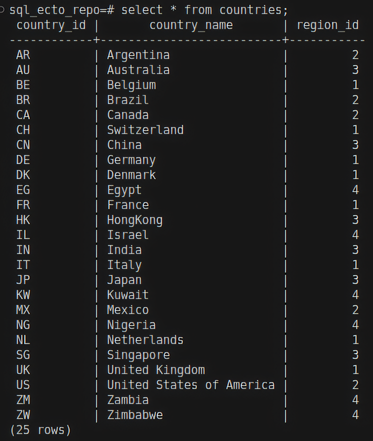
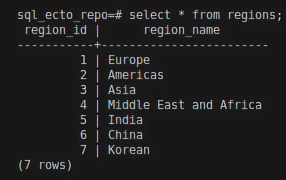
Now let's perform an inner join for these two tables in Ecto.
Expression example
For Example:
 HR.Region
 |> join(:inner, [r], c in HR.Country, on: r.region_id == c.region_id)
 |> select([r, c], [r, c])
 |> HR.Repo.all()
The above query will only return rows whose region_id is the same in both HR.Region and HR.Country. Here, r and c are reference variable for HR.Region and HR.Country. To know about reference variable refer Aliases in Ecto.
Explanation:
join(:inner, [r], c in HR.Country, on: r.region_id == c.region_id)
:inneris a join type[r]is a variable is a reference toHR.Regionc in HR.Countryis another schema with a reference variableon: r.region_id == c.region_idis the common field for both schema.
Result:
iex(3)> HR.Region |> join(:inner, [r], c in HR.Country, on: r.region_id == c.region_id) |> select([r, c], [r, c])|>  HR.Repo.all()

[
  [
    %HR.Region{
      __meta__: #Ecto.Schema.Metadata<:loaded, "regions">,
      region_id: 2,
      region_name: "Americas"
    },
    %HR.Country{
      __meta__: #Ecto.Schema.Metadata<:loaded, "countries">,
      country_id: "AR",
      country_name: "Argentina",
      region_id: 2
    }
  ],
  [
    %HR.Region{
      __meta__: #Ecto.Schema.Metadata<:loaded, "regions">,
      region_id: 3,
      region_name: "Asia"
    },
    %HR.Country{
      __meta__: #Ecto.Schema.Metadata<:loaded, "countries">,
      country_id: "AU",
      country_name: "Australia",
      region_id: 3
    }
  ],
  [
    %HR.Region{
      __meta__: #Ecto.Schema.Metadata<:loaded, "regions">,
      region_id: 1,
      region_name: "Europe"
    },
    %HR.Country{
      __meta__: #Ecto.Schema.Metadata<:loaded, "countries">,
      country_id: "BE",
      country_name: "Belgium",
      region_id: 1
    }
  ],
  [
    %HR.Region{
      __meta__: #Ecto.Schema.Metadata<:loaded, "regions">,
      region_id: 2,
      region_name: "Americas"
    },
    %HR.Country{
      __meta__: #Ecto.Schema.Metadata<:loaded, "countries">,
      country_id: "BR",
      country_name: "Brazil",
      region_id: 2
    }
  ],
  [
    %HR.Region{
      __meta__: #Ecto.Schema.Metadata<:loaded, "regions">,
      region_id: 2,
      region_name: "Americas"
    },
    %HR.Country{
      __meta__: #Ecto.Schema.Metadata<:loaded, "countries">,
      country_id: "CA",
      country_name: "Canada",
      region_id: 2
    }
  ],
  [
    %HR.Region{
      __meta__: #Ecto.Schema.Metadata<:loaded, "regions">,
      region_id: 1,
      region_name: "Europe"
    },
    %HR.Country{
      __meta__: #Ecto.Schema.Metadata<:loaded, "countries">,
      country_id: "CH",
      country_name: "Switzerland",
      region_id: 1
    }
  ]
]
In the above IEx shell, you can see that only matching region_id values in both HR.Region and HR.Country are returned.
Keyword example
HR.Repo.all(from r in HR.Region, join: c in HR.Country, on: r.region_id == c.region_id, select: [r, c])