LEFT JOIN
The left join command returns all rows from the left table and only the matching rows from the right.
For Example:
Let's use the countries table and regions table for this example. Refer Aliases in Ecto to know about this table and the database.
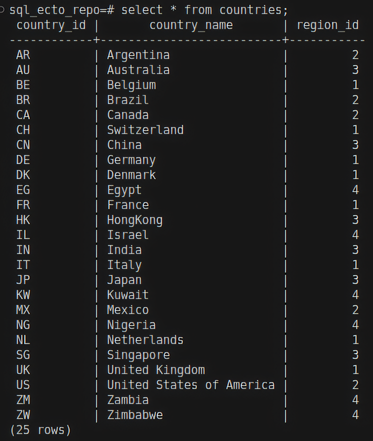
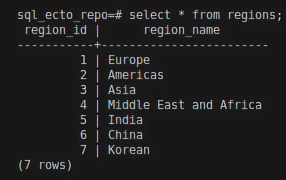
select * from countries left join regions on countries.region_id = regions.region_id;
The left join will return all rows from the countries table and only matching rows from the regions table.
Result:
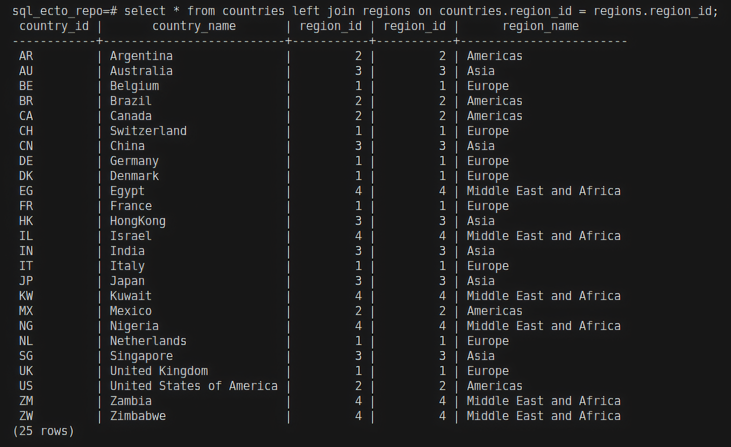
The regions table has 7 rows, and the countries table has 25 rows. The last 3 records in the regions table didn't match with any rows in the countries table. Since LEFT JOIN returns only matching values from the right-side table, these unmatched values in the regions table didn't appear in the result in the above example.
Ecto query for left join
join/5
The join/5 function is used to perform a left join in Ecto. For more information about the join/5 function, visit my JOIN page.
:left option in join
Expression example
For Example:
HR.Region
|> join(:left, [r], c in HR.Country, on: r.region_id == c.region_id)
|> select([r, c], [r,c])
|> HR.Repo.all()
The above query will return all records from the HR.Region and only match records from HR.Country.
Explanation:
HR.Regionschema as the first argument.[r]is the reference variable for theHR.Regionschema. To know about reference variable refer Aliases in Ecto.c in HR.Countryis another schema and it's reference variable.on: r.region_id == c.region_idcondition.
Result:
iex(6)> HR.Region |> join(:left, [r], c in HR.Country, on: r.region_id == c.region_id) |> select([r, c], [r,c]) |> HR.Repo.all()

[
  [
    %HR.Region{
      __meta__: #Ecto.Schema.Metadata<:loaded, "regions">,
      region_id: 2,
      region_name: "Americas"
    },
    %HR.Country{
      __meta__: #Ecto.Schema.Metadata<:loaded, "countries">,
      country_id: "AR",
      country_name: "Argentina",
      region_id: 2
    }
  ],
  [
    %HR.Region{
      __meta__: #Ecto.Schema.Metadata<:loaded, "regions">,
      region_id: 3,
      region_name: "Asia"
    },
    %HR.Country{
      __meta__: #Ecto.Schema.Metadata<:loaded, "countries">,
      country_id: "AU",
      country_name: "Australia",
      region_id: 3
    }
  ],
  [
    %HR.Region{
      __meta__: #Ecto.Schema.Metadata<:loaded, "regions">,
      region_id: 1,
      region_name: "Europe"
    },
    %HR.Country{
      __meta__: #Ecto.Schema.Metadata<:loaded, "countries">,
      country_id: "BE",
      country_name: "Belgium",
      region_id: 1
    }
  ],
  [
    %HR.Region{
      __meta__: #Ecto.Schema.Metadata<:loaded, "regions">,
      region_id: 2,
      region_name: "Americas"
    },
    %HR.Country{
      __meta__: #Ecto.Schema.Metadata<:loaded, "countries">,
      country_id: "BR",
      country_name: "Brazil",
      region_id: 2
    }
  ],
  [
    %HR.Region{
      __meta__: #Ecto.Schema.Metadata<:loaded, "regions">,
      region_id: 5,
      region_name: "India"
    },
    nil
  ],
  [
    %HR.Region{
      __meta__: #Ecto.Schema.Metadata<:loaded, "regions">,
      region_id: 6,
      region_name: "China"
    },
    nil
  ],
  [
    %HR.Region{
      __meta__: #Ecto.Schema.Metadata<:loaded, "regions">,
      region_id: 7,
      region_name: "Korean"
    },
    nil
  ]
]
In the above result, you can see that all records in HR.Region are returned, even though some don't have matching records in HR.Country, which are returned as nil values for HR.Country.
Keywords
HR.Repo.all(from r in HR.Region, left_join: c in HR.Country, on: r.region_id == c.region_id, select: [r, c])