DISTINCT
The distinct command is used to fetch unique values from columns in a table. It helps in retrieving distinct values without duplicates from specified columns.
For Example:
Let's use the locations table for this query. To learn more about this table and the database, refer to Introduction.
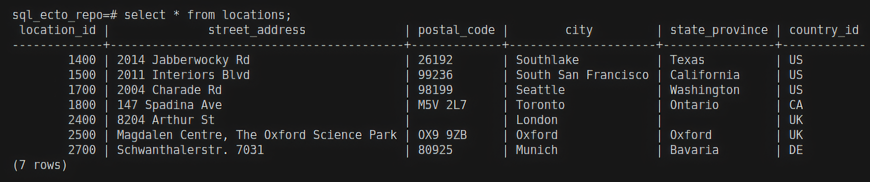
To find all unique country_id values present in the locations table, you can use the following query:
select distinct country_id from locations;
This query retrieves all unique country_id values from the locations table.
Result:
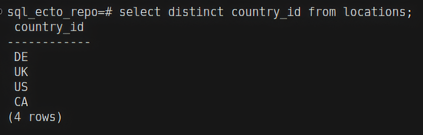
In this example, there are 4 unique country_id values in the locations table.
Ecto query for distinct
distinct/3
In Ecto, you can use the distinct/3 function to fetch unique values from a field. To retrieve all unique country_id values from HR.Location, you can use:
Expressions
For Example:
HR.Location
|> select([l], [l.country_id])
|> distinct(true)
|> HR.Repo.all()
This Ecto query fetches all unique values from the country_id field in HR.Location. Here, l is the reference variable representing HR.Location.
Result:

There are a total of 4 unique country_id values in HR.Location.
Keywords
HR.Repo.all(from l in HR.Location, distinct: true, select: l.country_id)
select: is a key. c is a value that is a reference variable for HR.Employee.