LIMIT Query
The LIMIT command is used to limit the number of records from being fetched.
For Example:
As explained in the Introduction part, the employees table has a total of 31 records. Now let's set a limit to it.
select * from employees limit 10;
Result:
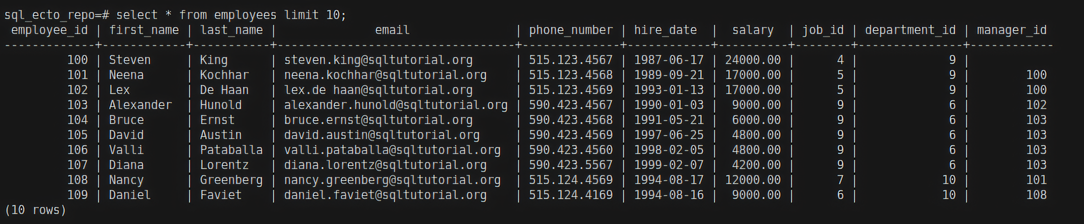
In this example, we are limiting the records to 10.
Ecto query for limit
limit/2
Expression
You can limit the records using the limit/2 function from Ecto.Query.
For Example:
HR.Employee
|> limit(2)
|> HR.Repo.all()
Result:
IEx(24)> HR.Employee |> limit(2) |> HR.Repo.all()

[
  %HR.Employee{
    __meta__: #Ecto.Schema.Metadata<:loaded, "employees">,
    employee_id: 100,
    first_name: "Steven",
    last_name: "King",
    email: "steven.king@sqltutorial.org",
    phone_number: "515.123.4567",
    hire_date: ~D[1987-06-17],
    salary: Decimal.new("24000.00"),
    manager_id: nil,
    job_id: 4,
    department_id: 9
  },
  %HR.Employee{
    __meta__: #Ecto.Schema.Metadata<:loaded, "employees">,
    employee_id: 101,
    first_name: "Neena",
    last_name: "Kochhar",
    email: "neena.kochhar@sqltutorial.org",
    phone_number: "515.123.4568",
    hire_date: ~D[1989-09-21],
    salary: Decimal.new("17000.00"),
    manager_id: 100,
    job_id: 5,
    department_id: 9
  }
]
Keywords
Limit the records to 2 using the Keywords format
HR.Repo.all(from c in HR.Employee, limit: 2)
In this example, limit is a key and its value is 2. Here c is the [reference variable](/blog/Aliases in Ecto). We are limiting the records to 2 using the Keywords format.