COUNT
The count command is used to determine the number of records or non-null values in a column within a table. You can also count the entire table.
For Example:
To count the total number of rows in the employees table:
select count(*) from employees;
\* refers to the entire table.
Result:
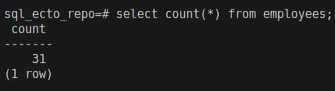
Now, let's count the non-null phone_number rows.
select count(phone_number) from employees;
Result:
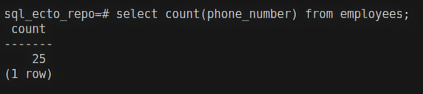
You can see that when we counted the entire table using * the result was 31, but when I counted only phone_number rows, the result was 25. It's because some records have a null value in the phone_number column that got removed.
Ecto query for count
In Ecto, you use the count/1 and count/0 functions to achieve similar results.
count/0
Expression example
For Example:
HR.Employee
|> select([c], count())
|> HR.Repo.all()
Here, c is the reference variable that refers to HR.Employee. Refer Aliases in Ecto to know about aliases/reference variables.
Result:

Keyword example
count/0
HR.Repo.all(from c in HR.Employee, select: count())
count/1
Expressions
Example:
HR.Employee
|> select([c], count(c.phone_number))
|> HR.Repo.all()
count(c.phone_number) -> We are calculating the count of phone_number for HR.Employee.c is the reference variable referring to the HR.Employee.
Result:

The total number of records that phone_number has a non-null value is 19.
Keywords
HR.Repo.all(from c in HR.Employee, select: count(c.phone_number))
select: is a key. c is a value that is a reference variable for HR.Employee.